





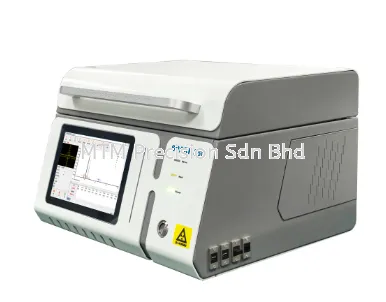


Cable Tracer for Network Cabinet Troubleshooting Malaysia - NOYAFA NF-918S

Cable Tracer for Network Cabinet Troubleshooting Malaysia - NOYAFA NF-918S
Network cabinets are essential parts of IT infrastructure in offices, commercial buildings, schools, factories, warehouses and data centres.
They often contain multiple Ethernet cables, patch panels, network switches and communication equipment.
When cables are poorly labeled or network documentation is incomplete, identifying the correct cable can become difficult.
For IT maintenance teams, network technicians, system integrators and cabling contractors in Malaysia, a Cable Tracer may help investigate unidentified network cables and support selected troubleshooting tasks.
The NOYAFA NF-918S Network Cable Tester includes manufacturer-documented cable tracing functions, together with RJ45 wiremap testing, PoE-related testing and additional network and fiber testing capabilities.
This guide explains how cable tracing fits into network cabinet maintenance, the risks associated with unidentified cables, troubleshooting considerations and how to choose suitable equipment.
It does not provide model-specific operating instructions or assume compatibility with every active network environment.
1. What Is a Network Cabinet?
A Network Cabinet is an enclosure used to organize and protect network equipment and cable connections.
Depending on the installation, a network cabinet may contain:
Network switches
Patch panels
Ethernet patch cords
Fiber optic patch panels
Routers
Network accessories
Cable management components
Power distribution equipment
Network cabinets may serve a single office or form part of a larger building network.
The complexity of the installation affects the type of maintenance and troubleshooting equipment required.
A network cabinet with incomplete cable labeling can create additional maintenance risks and increase troubleshooting time.
2. Why Network Cable Identification Matters
Cable identification helps technicians understand which physical cable connects to a particular device or network location.
Without reliable labeling, technicians may encounter:
Uncertainty about cable destinations
Difficulty identifying affected connections
Accidental disconnection of active equipment
Longer maintenance activities
Incomplete network documentation
Confusion during equipment replacement
A suitable cable tracer may help identify selected cables.
However, tracing results should be interpreted according to the instrument's documented capabilities and the network conditions.
Cable tracing supports identification, but it does not automatically establish cable performance or network health.
3. NOYAFA NF-918S Cable Tracing Functions
The NOYAFA NF-918S is a multifunction network testing instrument.
Manufacturer-published information identifies functions including:
Network cable tracing
Digital and analog cable tracing
RJ45 wiremap and continuity testing
PoE-related testing
RJ45 connector quality checking
Optical Power Meter
Visual Fault Locator
Non-contact voltage detection
These functions may be relevant to technicians responsible for copper Ethernet infrastructure and selected basic fiber optic maintenance tasks.
However, the exact tracing methods, supported cable conditions, connector compatibility and operating limitations must be verified against current manufacturer documentation.
Do not assume that the NF-918S can trace every energized network cable, identify every switch port or operate safely with all connected equipment.
4. Common Network Cabinet Troubleshooting Problems
Technicians may encounter several recurring issues in network cabinets.
Unlabeled Ethernet Cables
Cable destinations may be unknown.
Incorrect Patch Connections
A cable may be connected to an unintended network port.
Damaged Patch Cords
Physical damage may affect communication.
Poor Cable Management
Crowded cables can make identification and maintenance more difficult.
Intermittent Network Connections
Connector or equipment problems may cause unstable communication.
Incomplete Network Documentation
Records may not reflect the current installation.
These problems require different diagnostic approaches. Cable tracing is only one part of network cabinet troubleshooting.
5. Cable Tracer for Unlabeled Network Cables
Unlabeled cables are common in older or frequently modified network installations.
Technicians may need to identify a cable before performing maintenance or replacing equipment.
A suitable cable tracer may assist with selected identification tasks.
However, successful identification depends on:
Cable type
Network connection conditions
Instrument capabilities
Electrical environment
Access to the relevant cable
Approved testing arrangements
Cable tracing should not be treated as proof that a cable is correctly terminated or capable of supporting the required network performance.
6. Cable Tracing for Patch Panel Maintenance
Patch panels organize physical network cable terminations.
They are commonly used in offices, schools, factories and data centres.
Patch panel maintenance may involve:
Identifying cable destinations
Investigating missing labels
Checking documentation
Planning network changes
Investigating suspected physical connection problems
A cable tracer may support selected identification activities.
However, patch panels may connect to active production networks.
Technicians should verify whether the intended tracing method is suitable for the connected network equipment before testing.
7. Cable Tracer for Server Rack Troubleshooting
Server racks may contain network switches, servers, patch panels and multiple communication cables.
Unidentified cables can complicate maintenance.
Potential concerns include:
Incorrect cable disconnection
Confusion between similar patch cords
Difficulty identifying equipment connections
Incomplete network records
Maintenance-related service interruption
A suitable cable tracer may help identify selected physical connections.
However, server rack maintenance may require additional network management and equipment diagnostics.
A cable tracer does not replace switch management information, network topology records or approved change-control procedures.
8. Network Cabinet Troubleshooting for Offices
Office networks may support computers, printers, IP phones, Wi-Fi access points and other connected equipment.
Network cabinets often serve multiple departments or work areas.
When a connection fails, possible causes include:
Damaged patch cords
Incorrect cable connections
RJ45 termination problems
Network switch faults
Equipment configuration issues
Cable tracing may assist with identifying the relevant physical cable.
RJ45 wiremap testing may assist with selected wiring investigations.
However, network equipment and configuration problems require separate diagnostics.
Physical cable testing should be considered alongside network-level troubleshooting.
9. Network Cabinet Troubleshooting for Factories
Industrial facilities may operate network cabinets connected to production equipment, monitoring systems and communication infrastructure.
Potential challenges include:
Complex cable routing
Electrical interference
Environmental exposure
Restricted equipment access
Production-critical network connections
A cable tracer may support selected cable identification tasks.
However, industrial networks may require specialized safety and maintenance procedures.
Technicians should not assume that a general network cable tracer is suitable for every industrial communication system.
10. Network Cabinet Maintenance for Data Centres
Data centres often contain high-density network infrastructure.
Cable identification and documentation are important because incorrect maintenance actions may affect critical services.
A cable tracer may support selected physical identification tasks.
However, data centre maintenance may also require:
Network topology records
Equipment management information
Change-control approval
Cabling documentation
Specialized diagnostic equipment
Cable tracing alone does not establish that a network connection can be safely disconnected or modified.
11. Cable Tracing vs RJ45 Wiremap Testing
Cable tracing and wiremap testing serve different purposes.
Testing requirementCable TracerRJ45 Wiremap TesterIdentify a physical cablePrimary applicationNot its primary purposeInvestigate cable destinationMay assistLimitedDetect selected wiring faultsNot its primary purposeYes, with suitable equipmentEstablish cable performance certificationNoNoDiagnose network configurationNoNoConfirm full Ethernet performanceNoNo
The NF-918S includes manufacturer-documented cable tracing and RJ45 testing functions.
However, the exact supported conditions must be confirmed from official product documentation.
Cable identification and cable wiring verification are different troubleshooting activities.
12. Cable Tracing vs Network Switch Diagnostics
A cable tracer supports physical cable identification.
Network switch diagnostics may provide information about logical connections, interface status or network activity.
These approaches can complement each other.
However, the availability of switch diagnostic information depends on the network equipment and management system.
A physical cable identification result does not independently establish:
Network configuration
VLAN assignment
IP connectivity
Port security settings
Application performance
Network traffic conditions
Network cabinet troubleshooting may require both physical and logical network investigation.
13. Network Cabinet Troubleshooting Checklist
When investigating a network cabinet problem, technicians should consider the following areas.
SymptomPossible investigation areaUnknown cable destinationCable labeling, documentation and suitable tracingNetwork connection unavailableCable, switch, equipment and configurationSuspected RJ45 wiring faultSuitable wiremap testingIntermittent communicationConnectors, patch cords, switches and equipmentMultiple devices offlineShared switch, power and network infrastructureIncorrect patch connectionPatch panel records and physical connectionsFiber-connected cabinet issueOptical path, transceivers and appropriate fiber testingCable appears correct but network failsNetwork configuration and equipment diagnostics
This checklist is intended for general troubleshooting planning.
It does not replace manufacturer-specific operating instructions or approved maintenance procedures.
14. Common Cable Tracing Mistakes
Assuming Every Cable Can Be Traced Under the Same Conditions
Different instruments support different cable and connection conditions.
Tracing Without Confirming Equipment Compatibility
An unsuitable testing arrangement may affect connected equipment.
Confusing Cable Identification with Wiremap Testing
Finding a cable does not establish that its conductors are correctly terminated.
Assuming a Cable Tracer Can Diagnose Network Configuration
Cable tracing does not identify every logical network problem.
Ignoring Existing Labels
Incorrect or outdated labels can lead to maintenance errors.
Disconnecting Cables Without Authorization
Network cabinets may support critical services.
Ignoring Electrical Safety
Network cabinets may contain power distribution equipment and energized systems.
Technicians should follow manufacturer instructions, site safety requirements and approved maintenance procedures.
15. Network Cabinet Cable Management Checklist
Good cable management can support future maintenance activities.
Important considerations include:
Consistent cable identification
Accurate patch panel records
Clear equipment labels
Updated network documentation
Appropriate cable routing
Suitable physical protection
Approved maintenance procedures
Records of network changes
A cable tracer may help investigate unidentified cables.
However, it does not replace systematic cable labeling and documentation.
Reliable network cabinet maintenance depends on both suitable testing equipment and accurate infrastructure records.
16. How to Choose a Cable Tracer Malaysia
Before purchasing a Cable Tracer for Network Cabinet Troubleshooting, consider the following factors.
Cable Type
Confirm the types of network cables used in the installation.
Active Network Conditions
Determine whether tracing is required on connected or disconnected cables, and verify the instrument's documented suitability.
Network Cabinet Complexity
Consider the number of cables, patch panels and equipment connections.
Tracing Method
Review the manufacturer's documented tracing functions and limitations.
RJ45 Testing Requirements
Determine whether wiremap and continuity testing are also necessary.
PoE Testing Requirements
Confirm whether PoE-related measurements are relevant to the maintenance work.
Fiber Optic Requirements
Consider whether the network cabinet also contains fiber optic connections.
Multifunction vs Dedicated Equipment
A multifunction tester may offer convenience for selected network maintenance tasks.
Dedicated cable tracing or advanced network diagnostic equipment may be preferable for specialized requirements.
Manufacturer Documentation
Review current official specifications and operating limitations before purchasing.
The best cable tracer is the instrument that matches the actual cable identification requirements and network operating conditions.
17. Frequently Asked Questions
FAQ 1. What is a Cable Tracer?
A Cable Tracer is a tool used to help identify or follow suitable cables under supported conditions.
FAQ 2. Why is cable tracing useful in network cabinets?
It may help technicians identify unlabeled cables and investigate physical network connections.
FAQ 3. Does the NOYAFA NF-918S include cable tracing functions?
Yes. Manufacturer-published information identifies network cable tracing functions.
FAQ 4. Does the NF-918S support digital and analog cable tracing?
Manufacturer-published information identifies digital and analog cable tracing functions. Exact operating conditions should be verified.
FAQ 5. Can the NF-918S trace every active Ethernet cable?
Do not assume universal compatibility with energized or connected networks. Check the manufacturer's instructions.
FAQ 6. Can a Cable Tracer identify an unknown patch panel cable?
A suitable tracer may assist under supported conditions.
FAQ 7. Can a Cable Tracer detect RJ45 wiring faults?
Cable tracing and wiremap testing are different functions. A suitable wiremap tester is used for selected wiring fault investigations.
FAQ 8. Does the NF-918S include RJ45 wiremap testing?
Yes. Manufacturer-published information identifies RJ45 wiremap and continuity testing functions.
FAQ 9. Can a Cable Tracer certify Ethernet cable performance?
No. Cable tracing does not provide structured cabling performance certification.
FAQ 10. Is the NF-918S suitable for office network maintenance?
It may support selected cable identification and physical wiring checks.
FAQ 11. Can the NF-918S be used in server racks?
It may support selected network cable testing tasks under appropriate operating conditions.
FAQ 12. Can the NF-918S be used in data centres?
It may assist with selected physical network troubleshooting tasks, subject to approved maintenance procedures.
FAQ 13. Can a Cable Tracer diagnose VLAN or IP configuration problems?
No. Logical network configuration requires appropriate network diagnostics.
FAQ 14. Is cable tracing safe on active network equipment?
Suitability depends on the instrument and connected equipment. Follow manufacturer instructions and approved site procedures.
FAQ 15. Where can I enquire about the NOYAFA NF-918S in Malaysia?
Contact MTM Precision Sdn Bhd for product enquiries, application discussions and quotation requests.
18. NOYAFA NF-918S Supplier Malaysia
MTM Precision Sdn Bhd supplies professional testing and measurement instruments for customers throughout Malaysia.
If you are looking for a Cable Tracer for Network Cabinet Troubleshooting Malaysia, our team can help you evaluate whether the NOYAFA NF-918S matches your intended application.
We welcome enquiries involving:
Network cabinet troubleshooting
Cable identification
Patch panel maintenance
Server rack cable tracing
RJ45 wiremap testing
PoE-related network maintenance
Office and industrial network infrastructure
Data centre cabling maintenance
When contacting our team, please share your cable type, network cabinet environment, whether the cables are connected to active equipment and the required testing functions.
This information can help determine whether a multifunction network tester or dedicated cable tracing equipment is more suitable.
Contact MTM Precision Sdn Bhd
MTM Precision Sdn Bhd
Puchong Showroom & Service Centre
No. 29-1 & 29-2, Jalan Bandar 18,
Pusat Bandar Puchong,
47160 Puchong, Selangor, Malaysia.
WhatsApp / Mobile: +6016-660 7346
Email: mtmpre@yahoo.com
Office Tel: +603-80807172
Website: https://www.mtmpre.com.my
We welcome enquiries from Kuala Lumpur, Selangor, Johor, Penang, Perak, Melaka, Negeri Sembilan, Sabah, Sarawak and throughout Malaysia.
SEO Meta Description
Explore NOYAFA NF-918S cable tracer for network cabinet troubleshooting Malaysia. Learn about patch panels, unlabeled cables, server racks and maintenance.
Internal Linking
Related Article 1: Noyafa NF-918S Network & Fiber Cable Tester Malaysia (Article 1)
Related Article 2: NOYAFA NF-918S Review Malaysia - Features, Applications and Limitations (Article 2)
Related Article 3: Best Network Cable Tester with Optical Power Meter Malaysia - NOYAFA NF-918S (Article 3)
Related Article 4: Network Cable Tester for Data Centre Technicians Malaysia - NOYAFA NF-918S (Article 5)
Related Article 5: How to Trace Network Cable in a Server Rack Malaysia - NOYAFA NF-918S (Article 6)
Related Article 6: How to Test RJ45 Cable Continuity Malaysia - NOYAFA NF-918S (Article 7)
Related Article 7: How to Find Open, Short and Cross Faults in Ethernet Cable Malaysia - NOYAFA NF-918S (Article 8)
Related Article 8: How to Test PoE Cable and PoE Switch Malaysia - NOYAFA NF-918S (Article 9)
Related Article 9: Network Cable Tester for CCTV Contractors Malaysia - NOYAFA NF-918S (Article 17)
Related Article 10: Digital vs Analog Cable Tracing Malaysia (Planned Article 19)
Related Article 11: RJ45 Crimping Test and Connector QC Malaysia (Planned Article 20)
Related Article 12: Which NOYAFA Network Cable Tester Should You Buy Malaysia (Planned Article 26)
Related Article 13: Network Testing Tools for Data Centre Maintenance Malaysia (Planned Article 27)
Related Article 14: Network Cable Tester for Johor Data Centre Contractors (Planned Article 29)
Related Article 15: Network Cable Tester for Selangor & Kuala Lumpur IT Contractors (Planned Article 30)
Internal links should be connected to verified published URLs when the corresponding articles become available.
08 Nov 2026


