









Share:


Specifications
SKU: CUSTOM CO2 Monitor CO2- M1
Product overview
![[Measurement item] CO2](https://www.kk-custom.co.jp/function/function_CO2.svg "[Measurement item] CO2")
![[Measurement items] Temperature, thermistor](https://www.kk-custom.co.jp/function/function_Temperature_Thermistor.svg "[Measurement items] Temperature, thermistor")
![[Measurement item] Humidity](https://www.kk-custom.co.jp/function/function_Humidity.svg "[Measurement item] Humidity")
![[Function] Date display](https://www.kk-custom.co.jp/function/function_Date.svg "[Measurement item] Date display")
![[Function] Clock](https://www.kk-custom.co.jp/function/function_clock.svg "[Function] Clock") 24h
24h![[Measurement item] CO2 Alert](https://www.kk-custom.co.jp/function/function_CO2alert.svg "[Measurement item] CO2 Alert")
![[Features] AC adapter compatible](https://www.kk-custom.co.jp/function/function_ACAdaptor.svg "[Features] AC adapter compatible")
Monitor the CO2 levels in the surrounding environment on a large LCD.
- The visual and audible alarms prompt you to ventilate the surrounding environment.
- The ambient environment level is displayed in three levels: GOOD, NORMAL, and POOR.
- Calendar, clock, temperature and humidity can all be viewed on the same screen.
- The detection method used is NDIR (single light source, single wavelength).
- CO2 level automatic calibration function (always enabled when powered on)
- CO2 level manual calibration function
- Compliant with the "Guidelines for selecting carbon dioxide concentration measuring devices * "
- * Issued by the Ministry of Economy, Trade and Industry and the Industrial Gas Detection and Alarm Association on November 1, 2021
About the automatic calibration function
Automatic calibration of CO2 levels using atmospheric air .After 7.5 days of continuous operation, the CO2 level is automatically calibrated .
The lowest daily measurement value is recorded and the average value is used to calibrate the unit to 400 ppm.
Manual calibration function
If necessary, calibrate your site for CO2 levels of 400 ppm .- Place the device near a well-ventilated window, avoiding direct sunlight.
- Press the "Set", "▲", and "Max/Min▼" buttons simultaneously.
- The CO2 and 400 ppm indicators will flash on the top of the LCD screen .
- After about 30 minutes of flashing, the display will turn solid and the calibration will be complete.
*The automatic calibration function is always active (it cannot be disabled). * Measurement errors may occur in
places with poor ventilation or where CO2 levels are consistently high
. Please install the device in a well-ventilated location such as near a window. *If using the device in an environment where CO2 levels are consistently high, please try manual calibration. *Perform manual calibration in a well-ventilated location such as near a window, away from direct sunlight. Also, do not approach the device or place any machines that emit CO2
near it while manual calibration is in progress .
Part names
Main unit
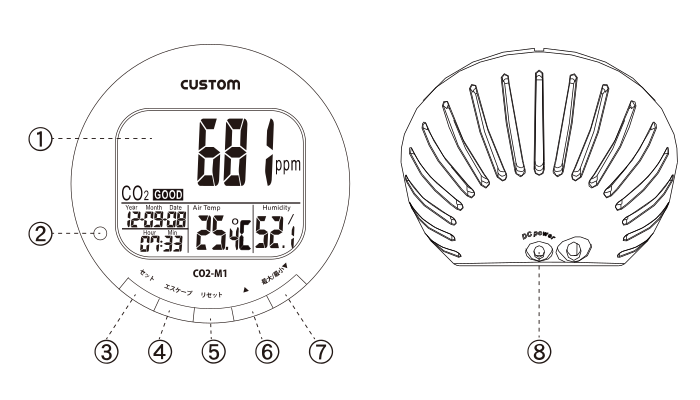
- ① Display section
- ② Power lamp
- ③ SET button: Used to change the reference values for the environmental display: "Good", "NORMAL" and "POOR".
- ④ Escape button: Used during setup operations.
- ⑤ Reset button: Use this to reset the maximum/minimum values for CO2, temperature, and humidity .
- ⑥ ▲ button
- ⑦ Max/Min ▼ button: Used to switch the currently displayed value to the maximum/minimum value.
- ⑧ AC adapter socket
Display section
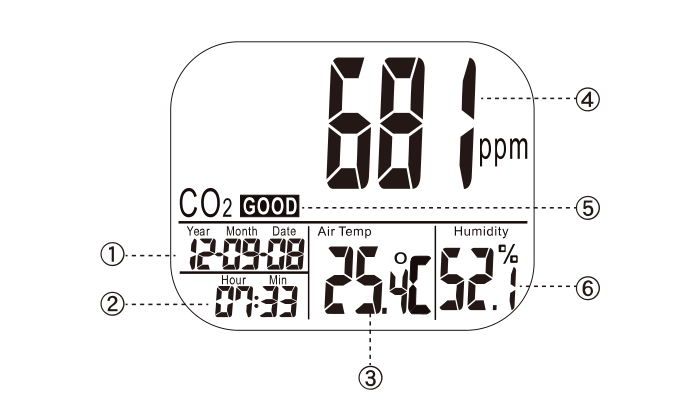
- ① Calendar display (year/month/day)
- ② Current time
- ③ Temperature display
- ④ CO 2 concentration display
- ⑤ Environmental condition icon: Displays the current environment in three levels: "GOOD," "NORMAL," or "POOR."
- ⑥ Humidity display
▲Back to top of page
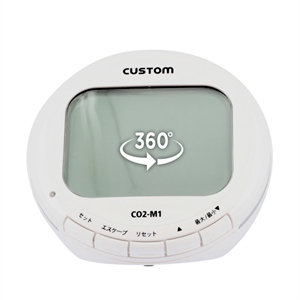
360° rotating image
Clicking on the image will open a new window.
specification
Electrical Performance
Carbon dioxide concentration ( CO2 )
| Measurement range | resolution | Measurement accuracy | Response time *1 |
|---|---|---|---|
| 0 to 9999 ppm | 1 ppm | 50 ppm ±5%rdg | 2 minutes |
temperature
| Measurement range | resolution | Measurement accuracy | Response time *2 |
|---|---|---|---|
| 0 to +50°C | 0.1℃ | ±1℃ | 2 minutes |
humidity
| Measurement range | resolution | Measurement accuracy | Response time *3 |
|---|---|---|---|
| 20 to 90% RH | 0.1%RH | ±7%RH *4 | 10 minutes |
*4 25°C, 20-90% RH, no condensation
General specifications
| Initial value of environmental condition display *5 |
|
|---|---|
| Alarm setting range | 1000 to 5000 ppm (can be set in 100 increments) |
| Operating temperature and humidity | 0 to +50°C, 10 to 90% RH (no condensation) |
| Storage temperature and humidity | -20 to +60°C, 5 to 90% RH (no condensation) |
| size | Approx. W 120 × H 120 × D 95 mm |
| weight | Approximately 210 g |
| power supply | AC adapter (included, model: VB12405A1) |
| accessories | Instruction manual, AC adapter |
| proofreading | Yes (temperature and humidity only) |
| JAN | 4983621300048 |
Frequently Asked Questions (FAQ)
Q: Please tell me about the sensor system.
A: The sensor method is NDIR.Q: What is the measurement range? (Can it be used in a room of XX square meters?)
Answer: The product (CO2 monitor ) measures the CO2 concentration in the area where it is placed .There are no restrictions on room size.
Inquiry - CUSTOM CO2 Monitor CO2- M1
View more
Testing Instruments


